 Kroky
Walk breaks for desk workers · New on the App Store
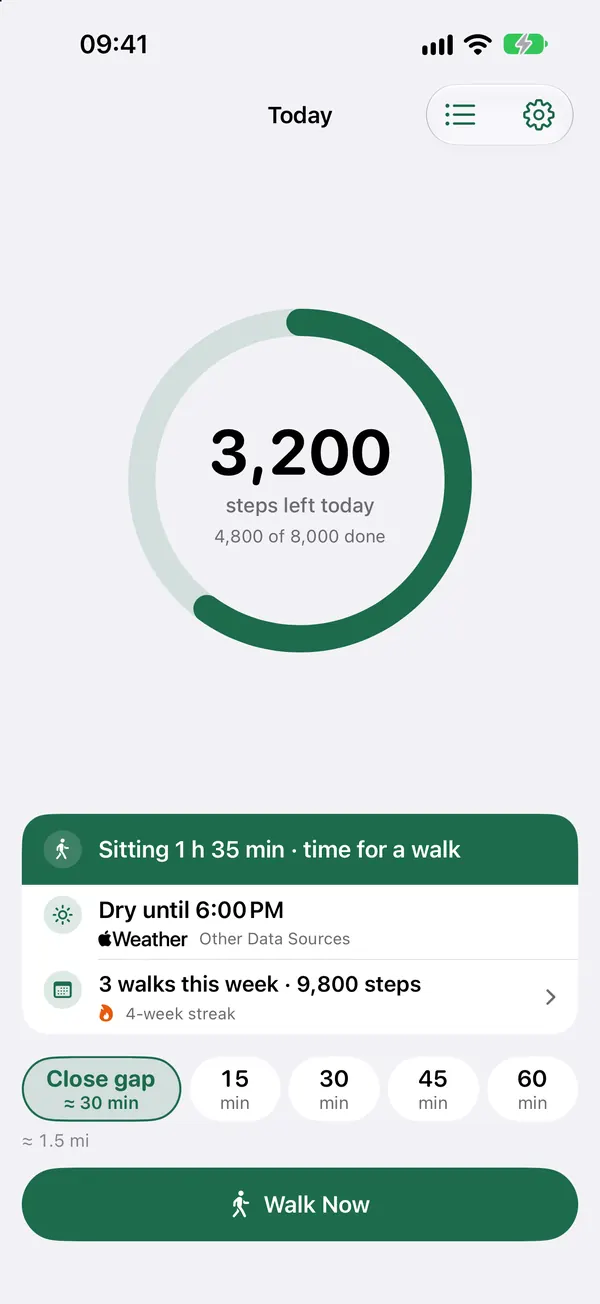
You've been sitting for 95 minutes. It's dry until 6 PM. Here's a 30-minute walk.
Kroky notices when you've been sitting, waits for dry weather and plans a loop from where you are, sized to close the gap to today's step goal. Tap Go and it guides you turn by turn.

Free every day · Kroky Pro: 7-day free trial · No account · iOS 17 or later
- Steps from Apple Health
- Dry-weather windows
- No tracking
 On a computer? Point your iPhone camera here to get Kroky.
See Kroky
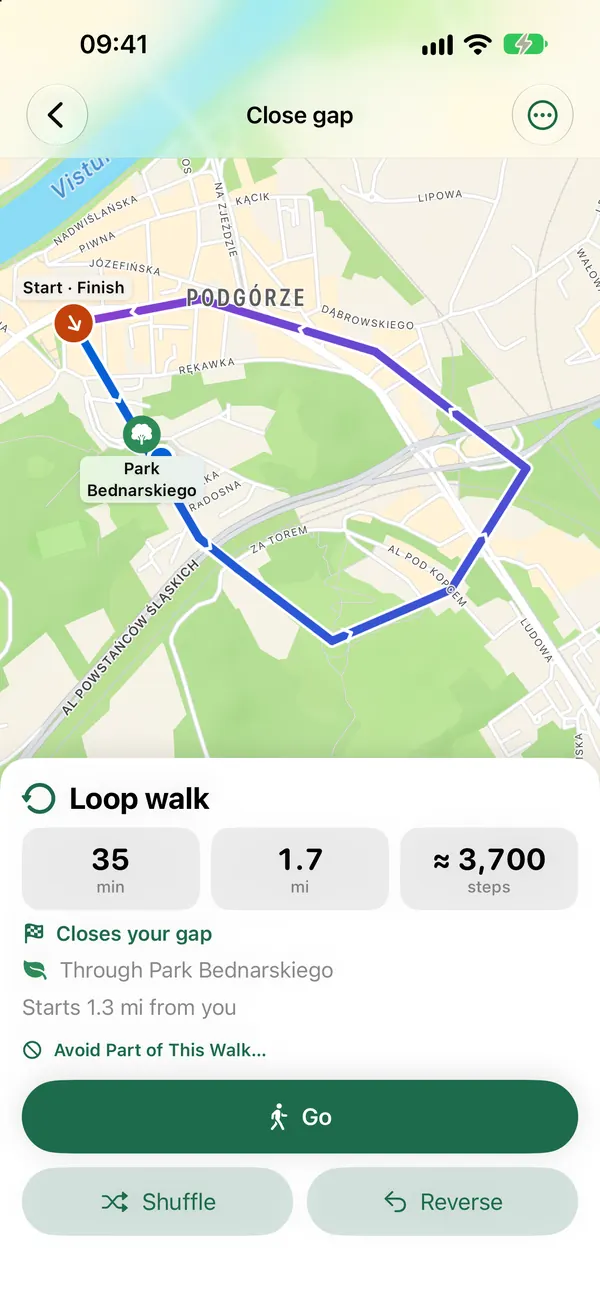
A walk sized to your step goalA loop through nearby parks that starts and ends where you are. 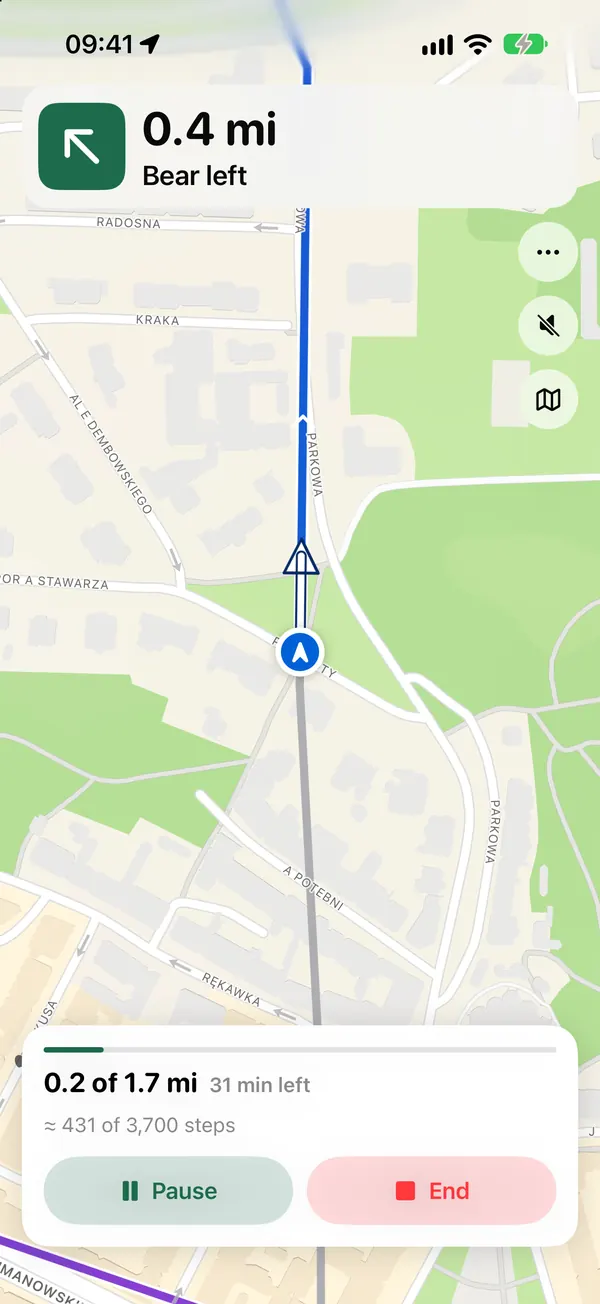
Every turn, right in KrokyFollow the loop on a live map, with spoken directions if you like. 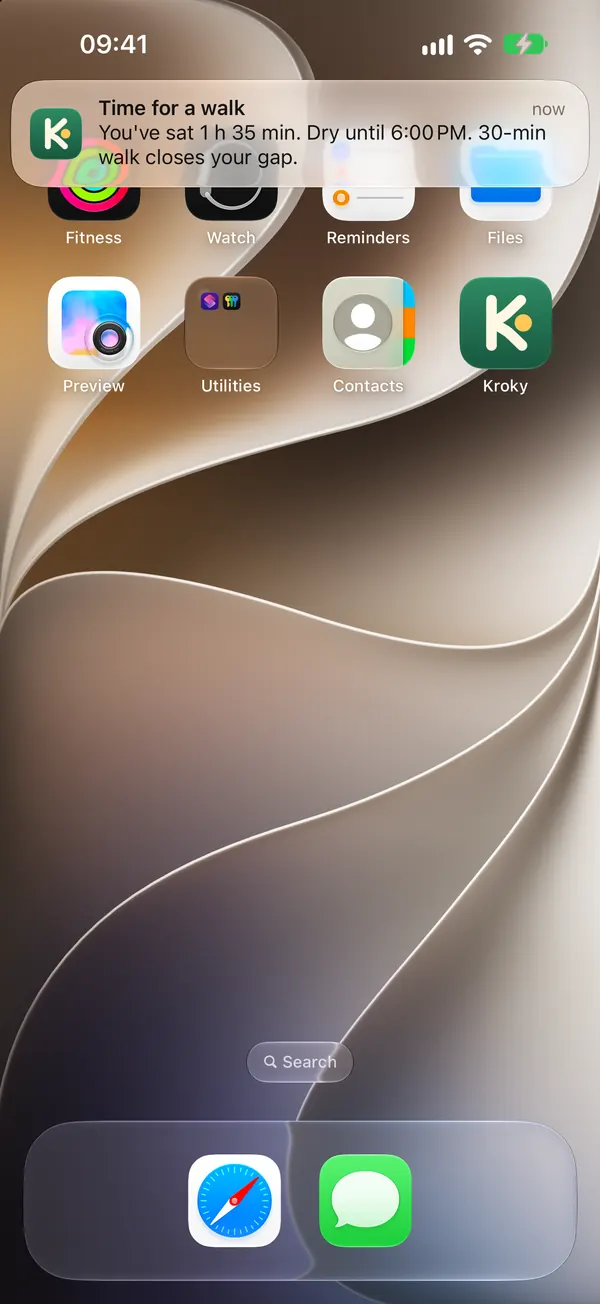
A nudge at the right momentOnly in your hours and only when it's dry. It can skip your meetings, too. 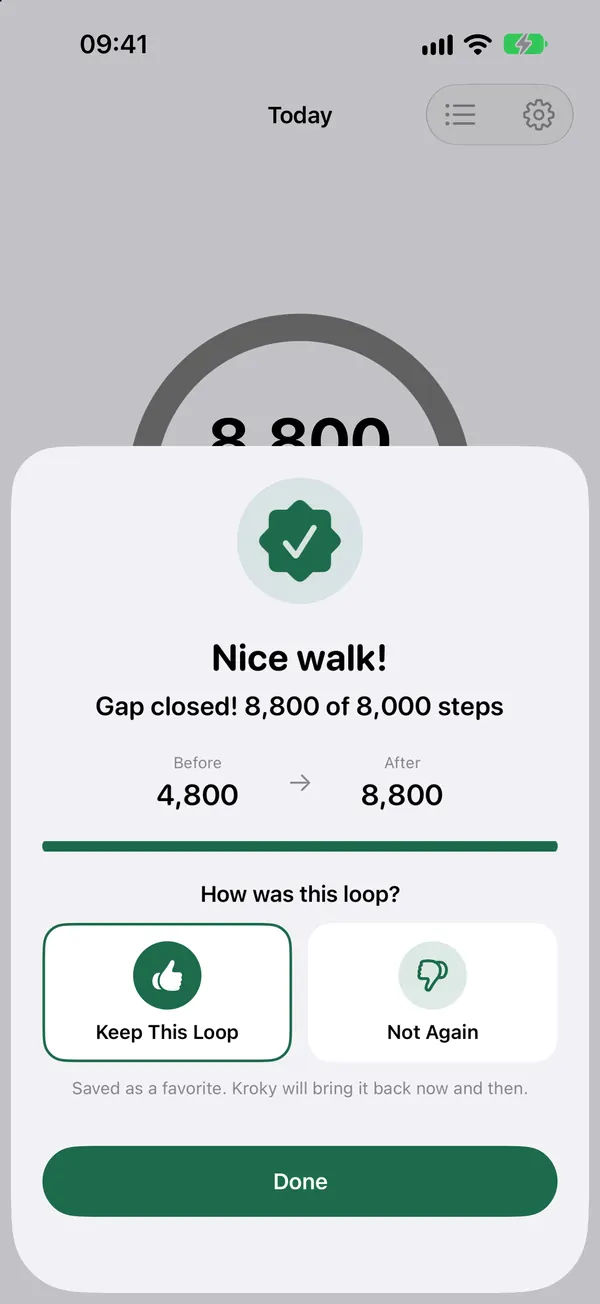
Close today's step gapSee what the walk added, and keep the loops you like. 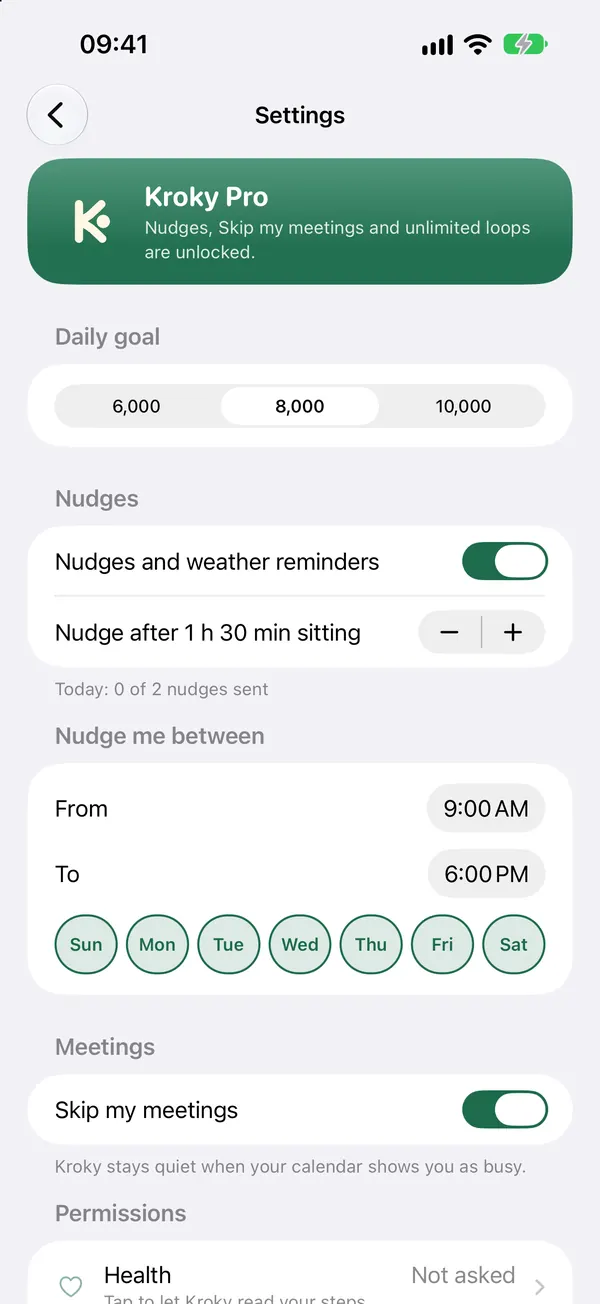
No account. No tracking.Set your hours and goal. Your steps never leave your iPhone.
How it works
- 1
It notices you've been sitting
Kroky reads your steps from Apple Health. After a long stretch without steps (90 minutes unless you change it), it's time for a walk.
- 2
It waits for dry weather
It checks the hourly forecast and finds today's dry window, so the walk doesn't start in the rain.
- 3
It plans a loop sized to your gap
From where you are and back, long enough to close the gap to today's step goal, or 15, 30, 45 or 60 minutes. It goes through parks and quiet streets where it can, and comes back a different way when the streets allow.
- 4
Tap Go and walk
Kroky guides you on a live map, with spoken directions if you like, even with the screen locked. Apple Maps or Google Maps are one tap away if you prefer them.
What Kroky does
Sitting nudgesKroky Pro
A notification after a long sit, only in the hours and on the days you choose, at most twice a day, and only when it's dry out.
Today's dry window
Home shows how long it stays dry, from Apple Weather's hourly forecast. Kroky can remind you when a dry window opens.
A loop that closes the gap
Steps turn into distance with your own stride, learned from your walks. The loop is just long enough for the steps you have left today.
Every turn, right in Kroky
Follow the loop on a live map with the walked part grayed out, distance and time left, and optional spoken directions.
Loops that get better
Shuffle for a different loop, reverse it, rate it, keep the ones you like and mark a street to avoid. A loop you've been offered won't come back for at least a week.
Your week at a glance
Walks this week, steps added, a streak, each walk's result and your walk history with every route.
Skip my meetingsKroky Pro
With your permission, Kroky checks your calendar on your iPhone and stays quiet during events marked busy.
Miles or kilometers
Distances follow your iPhone's region settings. Kroky speaks 49 languages.
Private by design
On your iPhone
Your steps, settings and walk history stay on the device. There is no Kroky server.
No account
Open the app and set a goal. There is nothing to sign up for.
No tracking
No analytics, no ads, no tracking SDKs. Location is used while Kroky is open, and during a walk you start, until you end it.
Read the Privacy Policy.
Walk free every day. Go Pro for the nudges.
Everything free stays free, forever.
| Free | Kroky Pro | |
|---|---|---|
| New loops sized to your step gap | 1 a day | Unlimited |
| Shuffle for a different loop | 1 a day | Unlimited |
| Today's dry-weather window | Yes | Yes |
| Your steps and today's gap | Yes | Yes |
| Follow each walk on a live map, with spoken directions | Yes | Yes |
| Open in Apple Maps or Google Maps | Yes | Yes |
| Reverse a loop, rate it, avoid a street | Yes | Yes |
| Weekly view, streak, walk results and history | Yes | Yes |
| Sitting nudges, with snooze and your own threshold | – | Yes |
| Reminders when a dry window opens | – | Yes |
| Skip my meetings | – | Yes |
| Your favorite loops mixed back in | – | Yes |
Kroky Pro is a yearly subscription with a 7-day free trial, or pay once for lifetime access with no subscription. Cancel the yearly plan anytime. The App Store shows the price for your country before you buy. In the US, Kroky Pro is $19.99 a year, or $49.99 once for lifetime access.
Questions people ask
What is Kroky?
Kroky: Walk Breaks is an iPhone app for people who sit a lot. It notices when you've been sitting, checks when it's dry outside and plans a walking loop from where you are, sized to close the gap to today's step goal. Then it guides you around the loop on a live map.
Is Kroky free?
Kroky is free to download and use, with one new loop and one shuffle a day, today's dry window, your steps, live guidance, your weekly view and walk history. Kroky Pro adds sitting nudges, weather reminders, Skip my meetings, unlimited loops and shuffles, and your favorite loops mixed back in. It's a yearly subscription with a 7-day free trial, or a one-time lifetime purchase. Everything free stays free, forever.
How is Kroky different from Apple Watch stand reminders?
A stand reminder asks you to stand and move for a minute each hour. Kroky is about walking: it nudges you only after a long stretch with no steps in Apple Health (90 minutes by default), at most twice a day, only in your hours and only when it's dry, and it can skip your meetings. Each nudge comes with a walk already planned for the steps you have left today, and it works without a watch. Sitting nudges are part of Kroky Pro.
Is there an app that reminds me to take a walk when I've been sitting too long?
Yes. Kroky reads your steps from Apple Health and, after a long stretch without steps, sends a nudge with a walk ready to go. You choose the hours, the days and how long a sit counts as too long; the default is 90 minutes, from 9 AM to 6 PM on weekdays. It sends at most two nudges a day and only when it's dry. Sitting nudges are part of Kroky Pro.
Which app plans a walking route to reach my daily step goal?
Kroky does. It takes the steps you still need today, turns them into a distance with your own stride, and plans a loop that starts and ends where you are and is just that long. You can also pick a 15, 30, 45 or 60-minute walk instead.
Can Kroky find a walking loop near me that avoids busy roads?
It tries to. Kroky looks for parks and walking paths around you with Apple Maps and OpenStreetMap, plans the loop through them and keeps off busy streets where the map allows. If you don't like a stretch, mark it and future loops will avoid it.
Does Kroky check the weather before suggesting a walk?
Yes. It uses Apple Weather's hourly forecast to find today's dry window and shows how long it stays dry. Nudges only come when it's dry, and Kroky Pro can remind you when a dry window opens.
Do I need an account?
No. There is no sign-up and no login. Open the app, allow Apple Health access and set a daily goal of 6,000, 8,000 or 10,000 steps.
Does Kroky track my location?
Only when you ask it to. Kroky uses your location while the app is open, to plan a loop and get the weather. It uses it continuously only during a walk you start, from Go until you end it. It never asks for "Always" location and never tracks you outside a walk. Your routes stay on your iPhone.
Does it work with Apple Watch?
Kroky has no Apple Watch app, but it reads your steps from Apple Health, which counts the steps from your iPhone and your Apple Watch together. So a walk with your watch on counts toward your goal.
Does Kroky guide me during the walk?
Yes. Tap Go and Kroky shows where you are on the loop, the part you've walked, and the distance and time left. Spoken directions are optional, and guidance keeps working with the screen locked. You can also open the loop in Apple Maps or Google Maps.
Is Kroky available for Android or iPad?
Not yet. Kroky is for iPhone, with iOS 17 or later.
Where does Kroky work?
Anywhere Apple Maps has walking directions. Loops are best where there are parks and footpaths nearby; in places with few, Kroky plans the quietest loop it can, or a walk there and back.
What languages does Kroky support?
49: English, Arabic, Bengali, Catalan, Chinese (Simplified and Traditional), Croatian, Czech, Danish, Dutch, Finnish, French (France and Canada), German, Greek, Gujarati, Hebrew, Hindi, Hungarian, Indonesian, Italian, Japanese, Kannada, Korean, Malay, Malayalam, Marathi, Norwegian, Odia, Polish, Portuguese (Brazil and Portugal), Punjabi, Romanian, Russian, Slovak, Slovenian, Spanish (Spain and Latin America), Swedish, Tamil, Telugu, Thai, Turkish, Ukrainian, Urdu and Vietnamese. English comes in US, British and Australian versions.
What does the name Kroky mean?
"Steps." It's the Ukrainian word кроки written in Latin letters. In Czech and Slovak, kroky is simply the everyday word for steps.
Who makes Kroky?
nakolini, a two-person studio of engineers Dmytro Hryb and Vitalii Kikot, who build apps and put AI to work for companies. See nakolini.com.
Guides
An app that reminds you to get up and walk when you've been sitting too long
Kroky is an iPhone app that reads your steps from Apple Health, notices a long stretch without them and, when it's dry outside, nudges you with a walk that's ready to go: a loop from where you are, sized to close the gap to today's step goal.
Read the guideHow long do I need to walk to reach my step goal?
At an easy walking pace of about 100 steps a minute, 1,000 steps take about 10 minutes and cover about 750 m (0.5 mi). So 3,000 steps left is a walk of about 30 minutes and 2.3 km (1.4 mi).
Read the guideHow to find a walking loop near you that starts and ends at your door
Open Kroky and tap Walk Now: it plans a loop that starts and ends where you are, goes through nearby parks and quiet streets where it can, comes back a different way when the streets allow, and fits the steps or minutes you want.
Read the guideA sitting reminder on iPhone, without an Apple Watch
Stand reminders are part of Apple Watch; the iPhone has no built-in reminder to get up. Kroky adds one: it reads the steps your iPhone already counts in Apple Health and, after a long stretch without them, nudges you with a walk sized to the steps you still need, when it's dry outside.
Read the guideHow to get 10,000 steps a day with a desk job
Split the gap into walks. At an easy pace, 1,000 steps take about 10 minutes, so if a desk day leaves you at 4,000 steps, two walks of about 30 minutes close the gap to 10,000. Kroky reads the steps you still need and plans a loop of that length from where you are.
Read the guide
Your next walk is ready when you are
Free every day. Try sitting nudges free for 7 days with Kroky Pro. No account, and your steps stay on your iPhone.